How We Built AI Citations That Actually Work

How We Built AI Citations That Actually Work
AI can produce finished deliverables in minutes. But nobody puts their name on work they haven't verified — and verifying every claim, against every source, is the actual bottleneck. Generation is cheap. Trust is expensive.
Most AI products treat citations as an afterthought: generate an answer, append a list of sources at the bottom. "Based on Document A, Document B, and Document C." The user reads the answer, sees the source list, and has no way to verify which claim came from which document — let alone which paragraph on which page. At that point, verification means re-reading the source documents yourself, which defeats the purpose of using AI in the first place.
For research and analysis professionals — investment analysts, consultants, anyone whose work product needs to be defensible — this gap determines whether AI is a real tool or an expensive toy. They don't want a list of sources. They want to click a claim, land on the exact sentence in the original document, and verify it with their own eyes in seconds.
Building that — citations that resolve to specific character ranges in text files, bounding boxes on PDF pages, cell ranges in spreadsheets, and path expressions in structured data — turned out to be one of the hardest and most rewarding engineering problems we've tackled at Brightwave.
The Problem With Citations in AI Systems
The standard RAG approach treats citations as a retrieval problem: find relevant chunks, pass them to the LLM, hope the LLM attributes correctly. This breaks down in several ways.
The LLM makes claims that span multiple passages. An analyst asks "How has this company's revenue mix shifted?" The answer synthesizes data from page 12, page 47, and a footnote on page 93. A single "Source: Annual Report" citation is meaningless. You need per-claim attribution — this sentence comes from here, that number comes from there.
Different document types need fundamentally different position metadata. A citation in a PDF needs page numbers and bounding box coordinates. A citation in a spreadsheet needs a sheet name and cell range. A citation in a JSON file needs a path expression. A citation in a plain text file needs character offsets. One schema doesn't fit all of these — but your agents, your database, and your frontend all need to work with all of them.
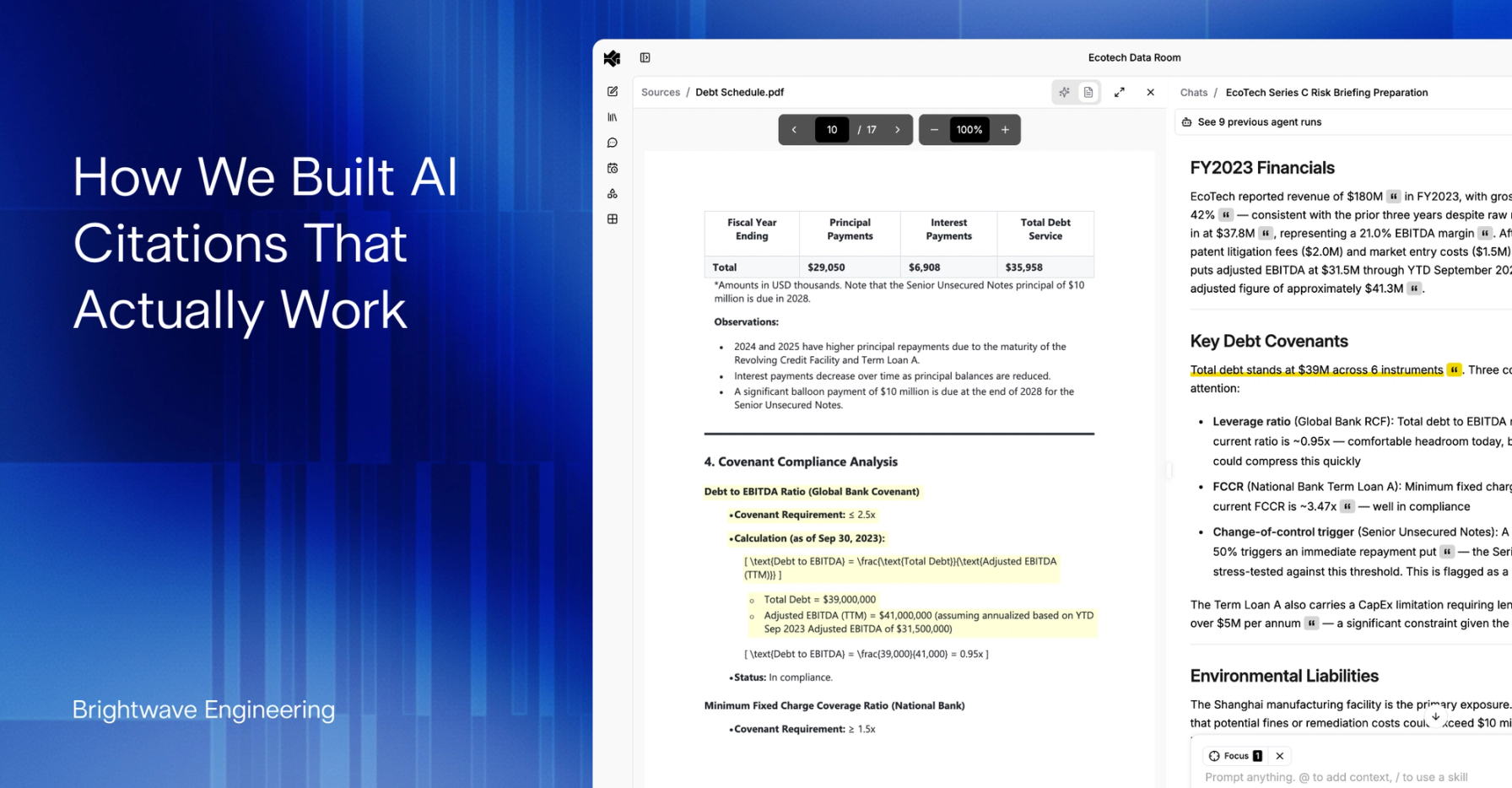
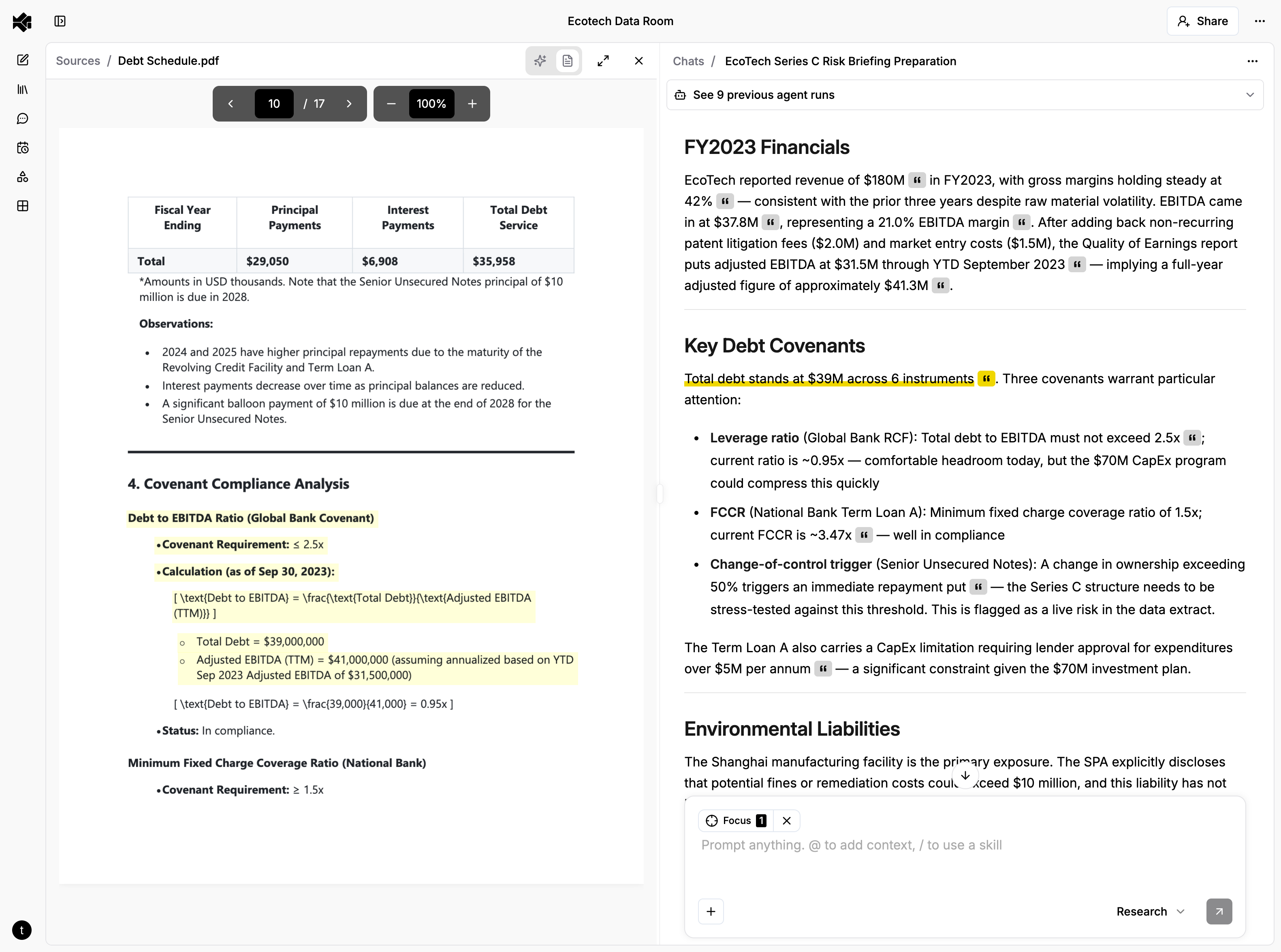
Citations have to be verifiable at the point of use. A citation that says "Source: Q3 Earnings Report" is a reference, not a citation. A real citation takes you to the exact passage, on the exact page, highlighted so you can read the original language and judge the claim yourself. Anything less shifts the verification burden back to the user.
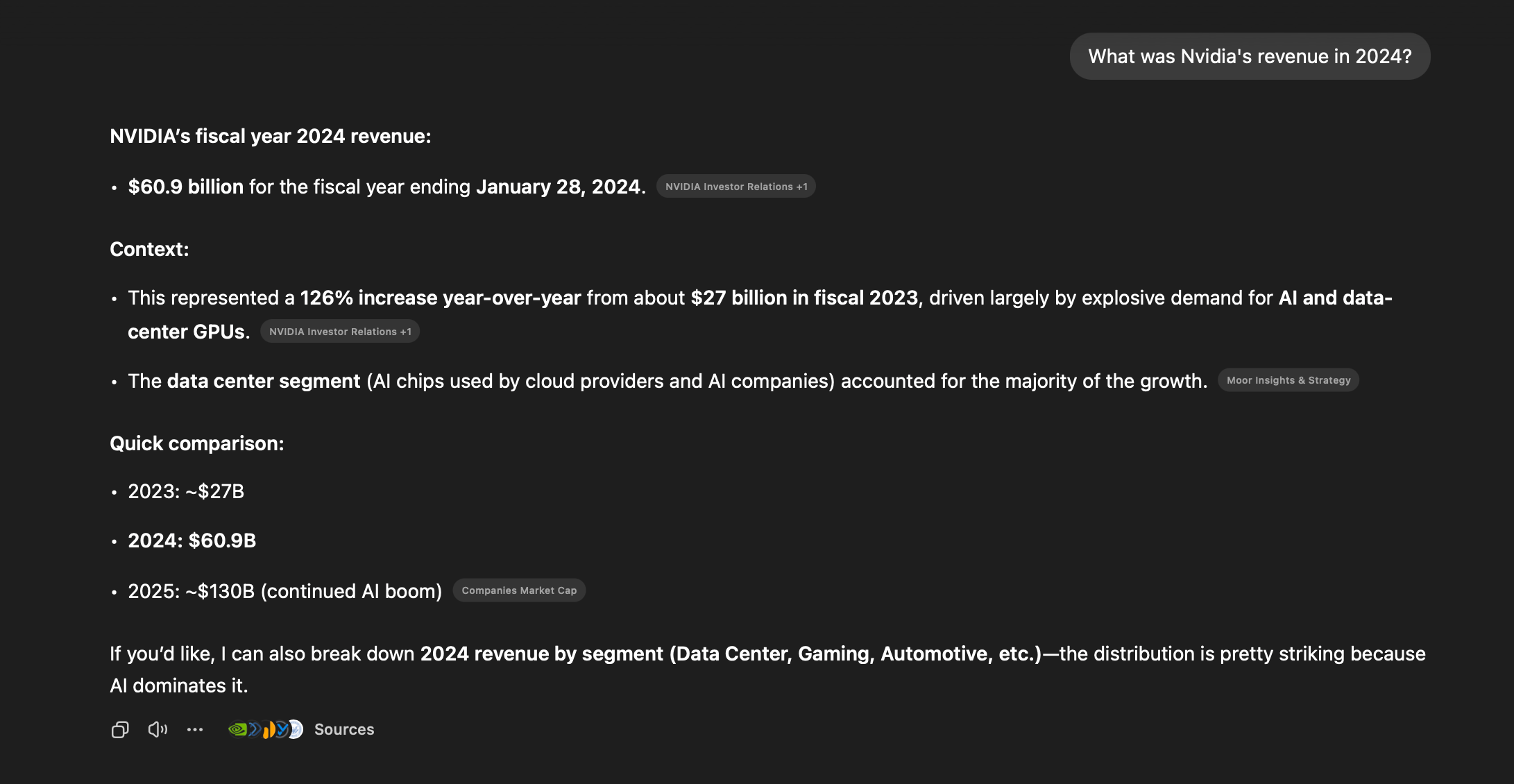
Sources in ChatGPT
One Click, Every Format
The real complexity is in making citations resolve — taking an evidence record and turning it into a highlighted passage the user can see. Each document format requires its own approach.
Text and Markdown: Character Ranges
For plain text and Markdown documents, evidence carries absolute character indices into the raw file — start_char_index and end_char_index. When a user clicks a citation, the frontend:
- Figures out which chunk of the progressively-rendered document contains those offsets
- Transforms the raw character indices through the rendering pipeline (our Markdown renderer adds spacing transformations that shift positions)
- Walks the rendered HTML's AST to find the text nodes that overlap the range
- Wraps them in <mark> tags
- Scrolls the highlight into view
The tricky part is step 2. Between the raw file and what the user sees, the text passes through Unicode decoding, LaTeX escaping, and line break preservation — each of which can shift character positions. The frontend maintains offset transformation functions that map from "position in raw file" to "position in rendered output." Get this wrong by even one character, and the highlight lands on the wrong sentence.
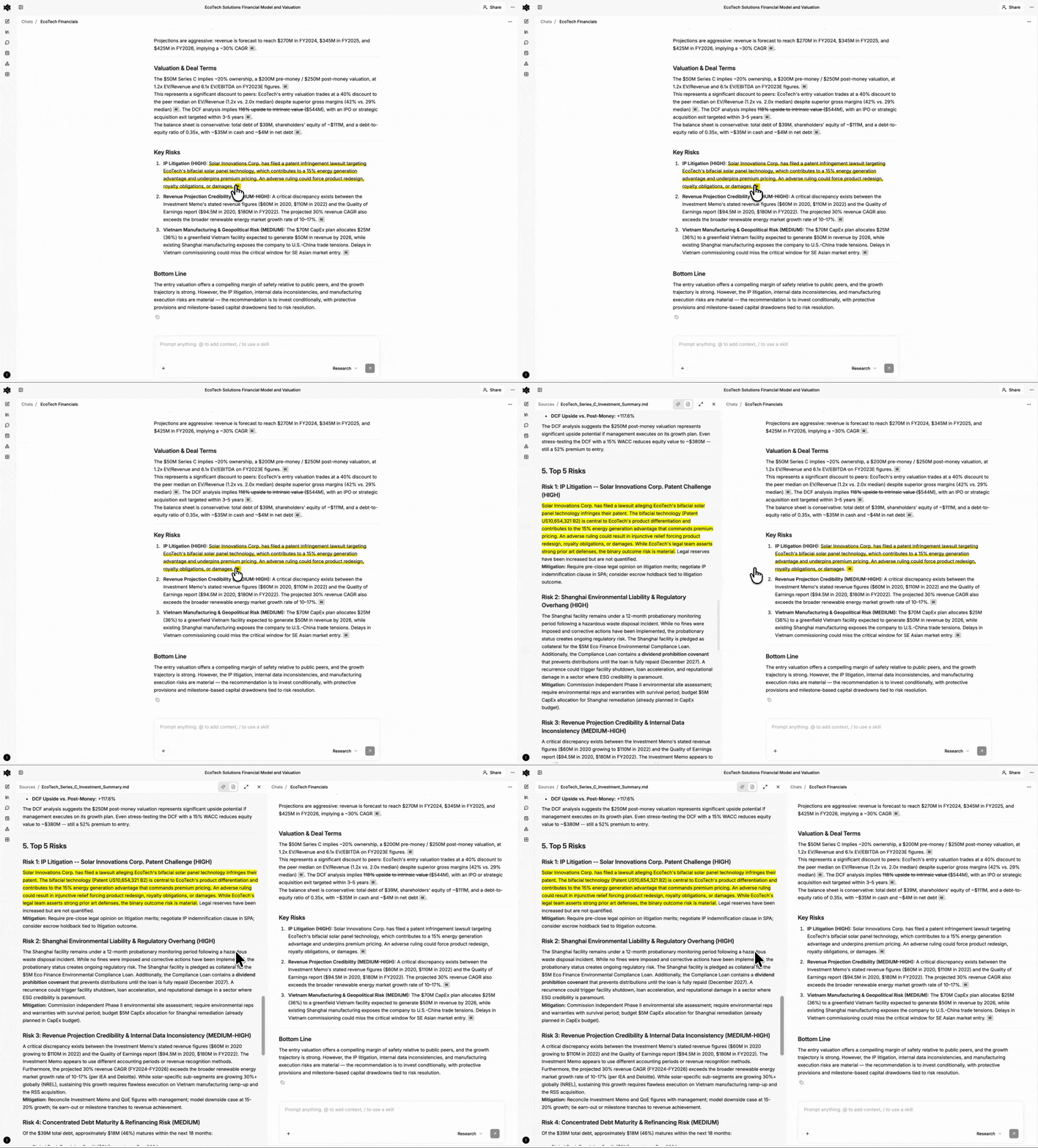
Rich Documents: Bounding Boxes
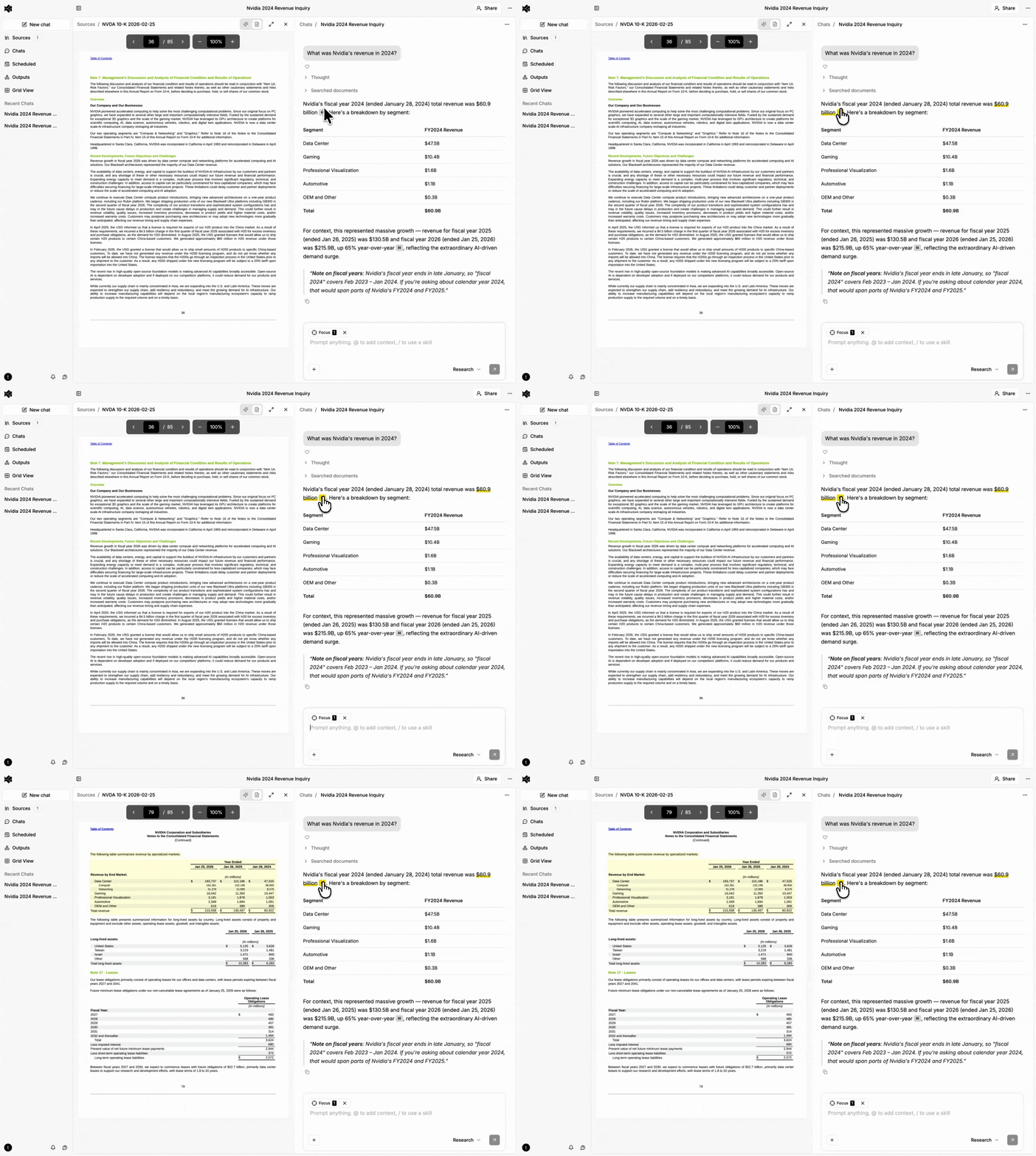
Rich documents (PDFs, Word documents, PowerPoint presentations) aren't best represented by raw character positions for citation UX — they're rendered page layouts made of positioned glyphs. Our document processing pipeline extracts text with bounding box coordinates (normalized 0-1 relative to page dimensions) during ingestion.
Evidence for rich content carries a list of bounding box objects, each with a page number and coordinates. The frontend renders these as semi-transparent overlays positioned absolutely within the page.
When evidence spans multiple pages, the UI shows a "continues on next page" indicator. Clicking it navigates to the next page and scrolls to the continuation.
Spreadsheets: Cell Ranges
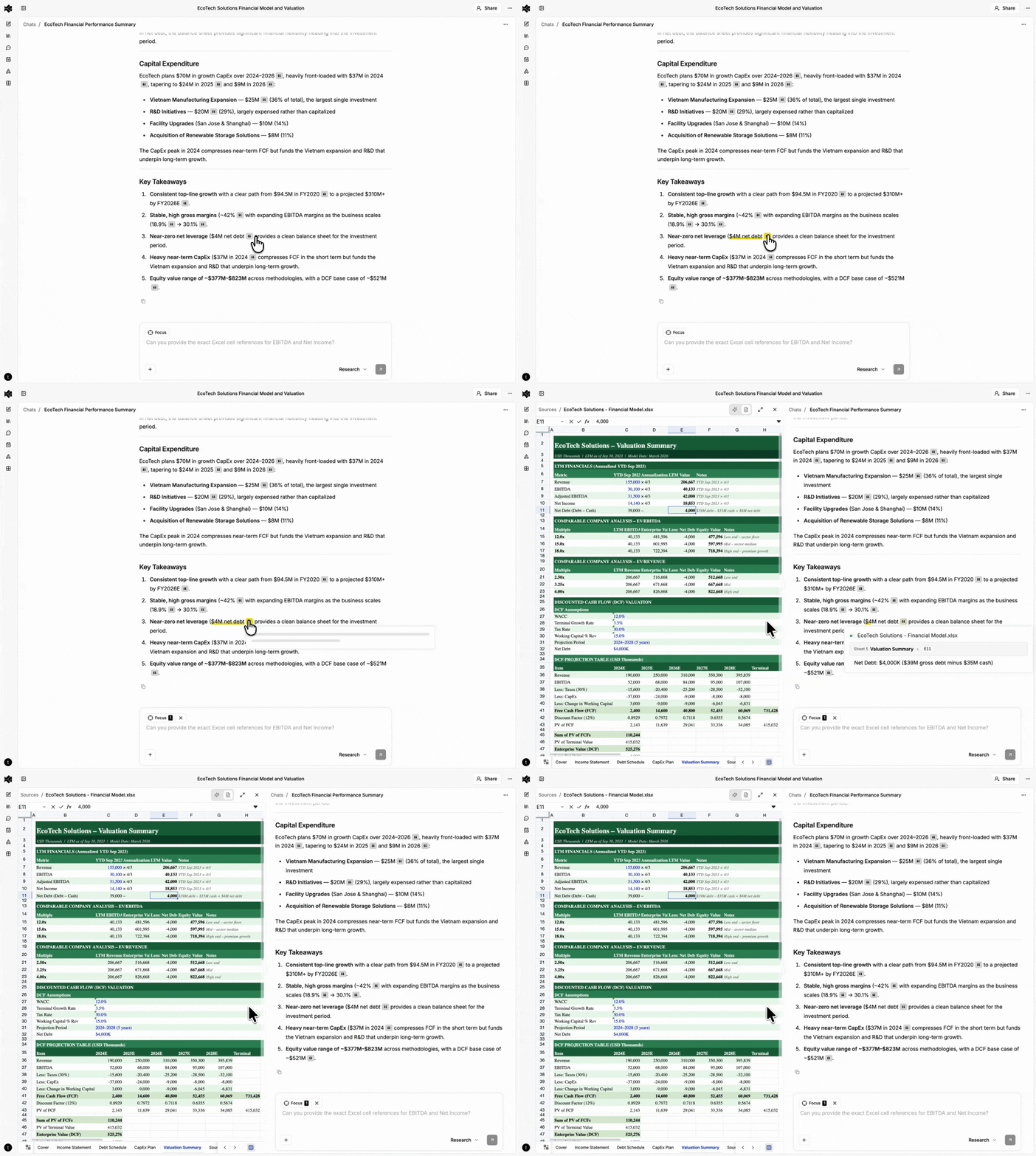
Spreadsheet evidence stores sheet name, sheet index, and A1-notation cell ranges (B2:D15). The agent reads actual cell values when creating evidence and maps them to specific cell ranges within the workbook — so clicking a citation navigates directly to the right sheet and highlights the exact cells.
On click, the frontend activates the correct sheet tab, parses the A1 notation into row/column indices, applies a highlight class to matching cells in the grid, and scrolls the viewport to center on the range.
Structured Data: Path Expressions
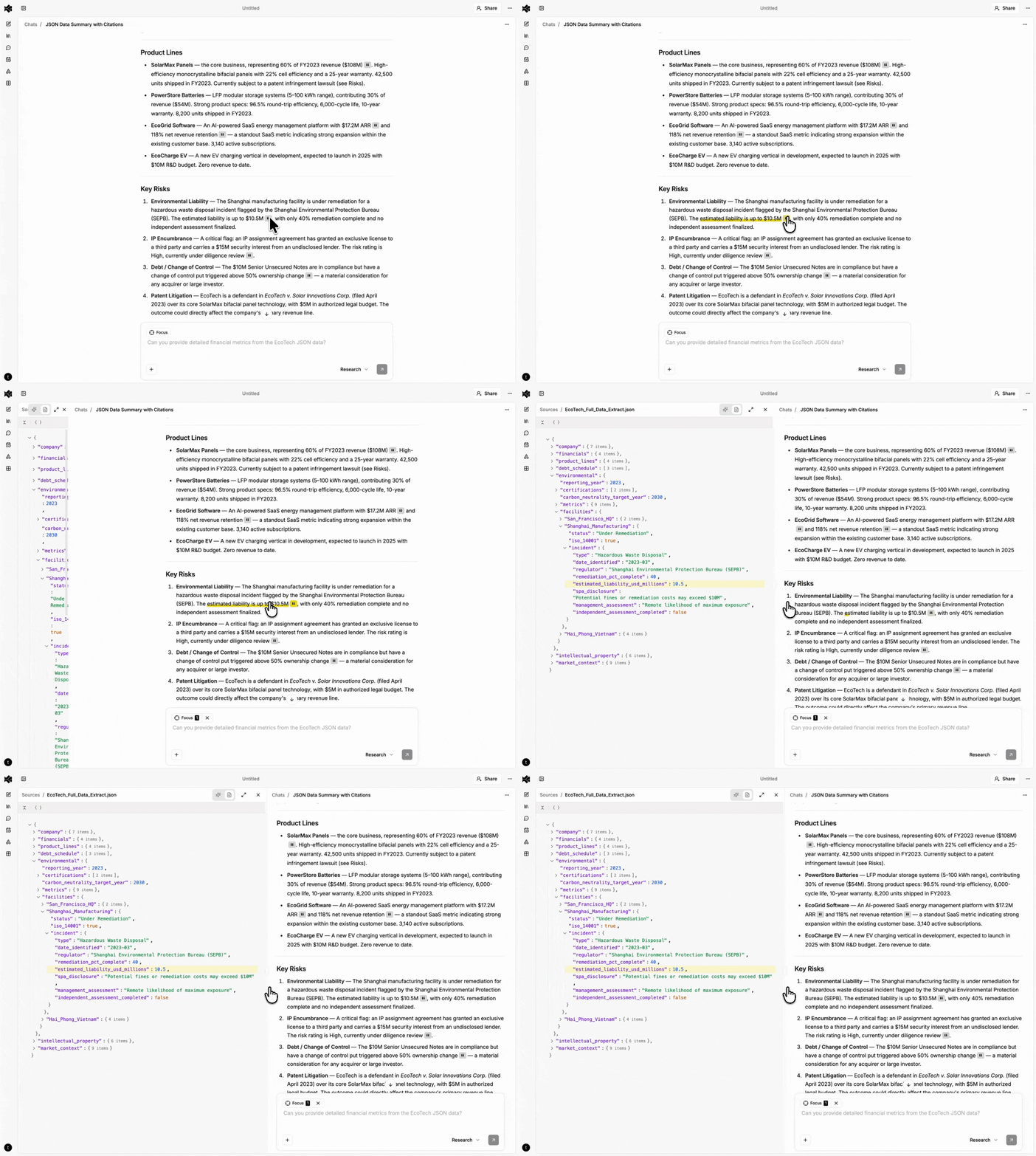
JSON and XML documents get path-based citations. For JSON, we use dot-notation paths (e.g., items.0.invoice_number). For XML, we use XPath expressions (e.g., //invoice/items/item[1]/price).
The evidence text is the serialized value at that path — the actual data the agent is citing. The frontend uses the path expression to navigate a tree viewer to the cited node and highlight it.
How Agents Create Citations
Citations don't happen by accident — they're built into the system from the ground up, starting at document processing time.
When we ingest a document, we don't just extract text. We attach the specific position metadata each format needs to the retrieval layer: character ranges for text, bounding boxes for PDFs and rich documents, cell addresses for spreadsheets, path expressions for structured data. This means that when an agent later reads a passage, the position information is already there — carried through from ingestion to retrieval to the agent's context.
When the agent writes its response, it embeds custom inline citation directives that flow naturally with the generated content:
The company's revenue grew 15% year-over-year :cit[reaching $115M in Q4]{evidence_id=abc123}
A parsing step strips these directives from the user-visible text, extracts the citation metadata, and creates citation records linking evidence to specific positions in the response. The user sees clean prose with small citation indicators. Click one, and you're looking at the source.
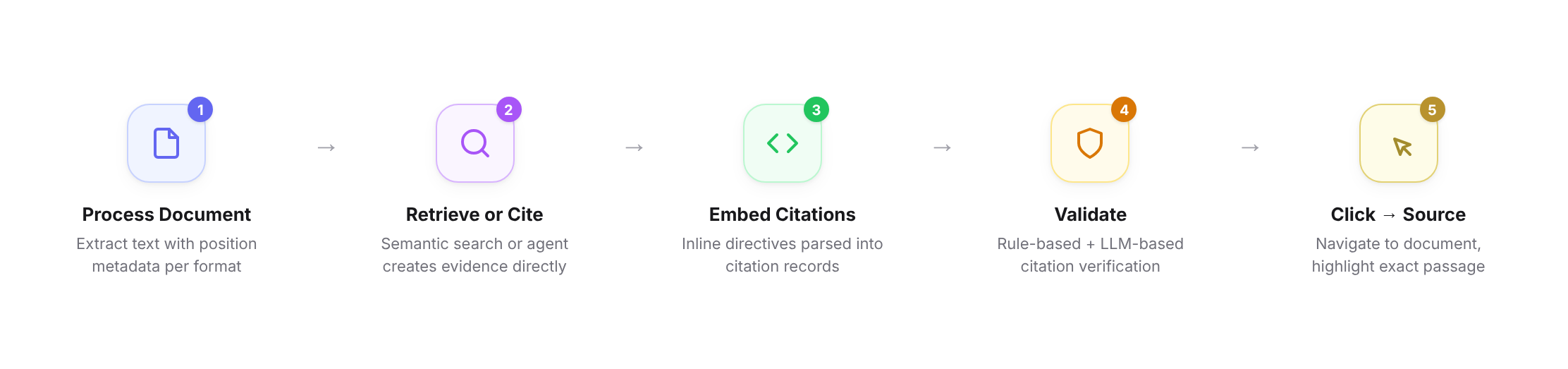
None of this matters if the citations are wrong. Whether evidence comes from retrieval or is created by an agent, every citation goes through quality control before it reaches the user. Rule-based validation checks structural correctness: are the character offsets within bounds, does the cell range reference a real sheet, does the path resolve to an existing node. LLM-based validation checks the harder question: does the cited passage actually support the claim being made in the generated content? A citation that's structurally valid but points to a passage that doesn't back the claim is worse than no citation at all, because it looks trustworthy. Both layers have to pass before a citation is considered valid.
Evaluating and Monitoring Citation Quality
Building a citation system is one problem. Knowing whether it actually works — across thousands of documents, dozens of formats, and millions of claims — is another. Citations that are right 95% of the time aren't good enough. That remaining 5% is exactly the kind of error that erodes trust.
We don't just test citations before shipping — we continuously evaluate them against real citations created by real users in production. This is the only way to catch the failure modes that matter: the ones that happen at scale, with messy real-world documents, under conditions no benchmark perfectly replicates.
Exhaustive benchmarking and continuous evaluation over production data. We test citation accuracy across document types, sizes, and complexity levels before shipping — and then keep testing against real citations created by real users in production. An LLM-as-judge pipeline reviews citation-claim pairs, checking whether the evidence actually supports the claim, whether substantive claims are properly cited, and whether the cited passage is minimal and specific rather than an entire page when a sentence would do. These evals run continuously as our processing pipelines and agent prompts evolve.
Operational monitoring tracks citation health the same way we track uptime. Resolution failure rates catch regressions in the processing pipeline. Citation density tracking catches agent prompt drift — sudden drops suggest tool call failures, sudden spikes suggest over-citation. We track success rates independently per document format so a regression in, say, PDF bounding boxes doesn't hide behind high text citation accuracy.
Every class of production failure becomes a new test case, so regressions don't recur. This loop — production monitoring → new evals → benchmarks → deploy — is how citation quality improves monotonically rather than oscillating with each change.
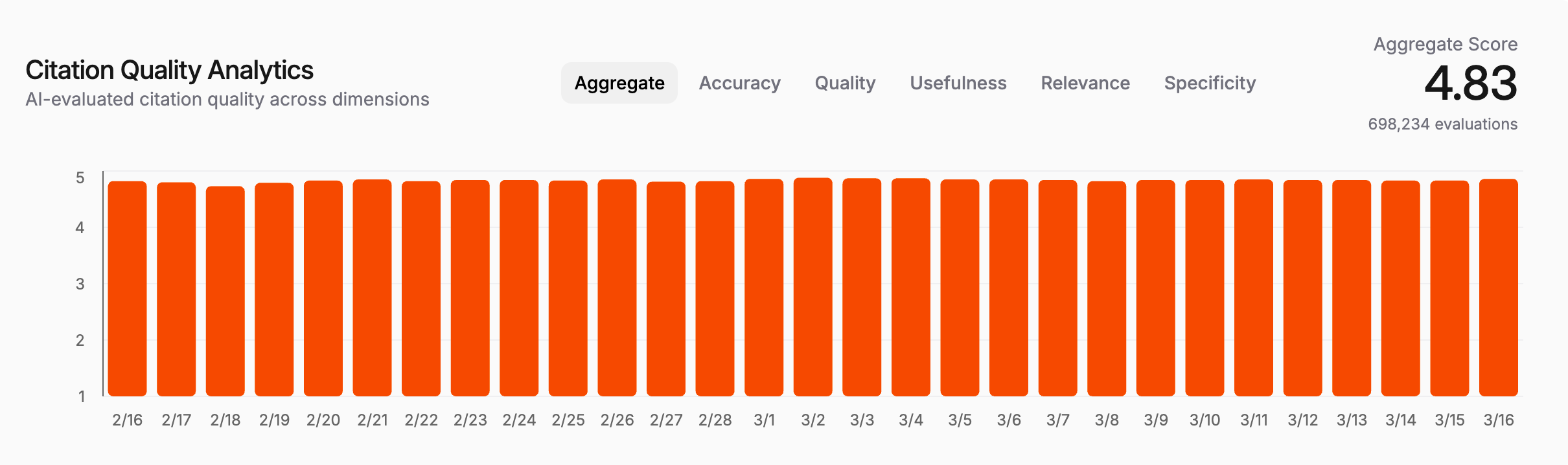
One of our internal Citation Quality Analytics dashboards, tracking aggregate citation quality across nearly a million evaluations in production over the last 30 days. Scores continue to trend upward as our processing pipelines and agent prompts improve.
What We Learned
Citations are a systems problem, not an LLM problem. The LLM's job is to identify what to cite. Everything else — position metadata, cross-format resolution, offset transformations, pixel-perfect highlighting, validation — is engineering. Most of the complexity lives outside the model.
Different document types need different citation UX, not just different metadata. Early on, we tried to unify everything into "highlighted text in a viewer." It doesn't work. A cell range in a spreadsheet needs grid-level highlighting with sheet navigation. A JSON path needs tree expansion. A PDF needs bounding box overlays. The evidence schema is polymorphic (discriminated union on evidence type), and the frontend has separate rendering paths for each. This is one of those cases where the abstraction is in the data model, not the UI.
You have to measure citation quality as rigorously as you measure model quality. It's tempting to treat citations as a UI feature — either they work or they don't. In practice, citation quality exists on a spectrum, and it degrades silently. A processing pipeline change shifts character offsets. A prompt tweak makes the agent cite less frequently. Without continuous measurement over real user data, you don't notice until users start complaining. By then, trust is already damaged.
The gap between "has citations" and "citations you can trust" is enormous. Appending source links is a weekend project. Building citations that resolve to exact positions across multiple document formats, survive validation at every layer, and render correctly in a viewer that progressively loads large files — that's months of engineering. It's also the difference between an AI tool that generates faster and one that lets professionals work faster. Those aren't the same thing.
Every shortcut in the citation system — every "Source: Document A" that should have been a highlighted passage on page 47 — is a moment where the user has to slow down and do the verification work themselves.
Building citations that actually work — not just citations that exist, but citations that take you to the exact place in the exact document and highlight the exact passage — is how you close that gap. It's how you turn AI from "interesting but I still have to check everything" into a tool that makes professionals genuinely faster at the work that matters.